> For the complete documentation index, see [llms.txt](https://docs.rmhpos.com/llms.txt). Markdown versions of documentation pages are available by appending `.md` to page URLs; this page is available as [Markdown](https://docs.rmhpos.com/store-manager/manage-items/bottle-deposits/understanding-bottle-deposits.md).
# About bottle deposits
This topic describes best practices for bottle deposits.
Today, many jurisdictions have container recycling programs to encourage consumers to recycle specific types of containers, such as aluminum cans, plastic bottles, milk boxes, drink boxes and drink pouches, gable top containers, and glass bottles.
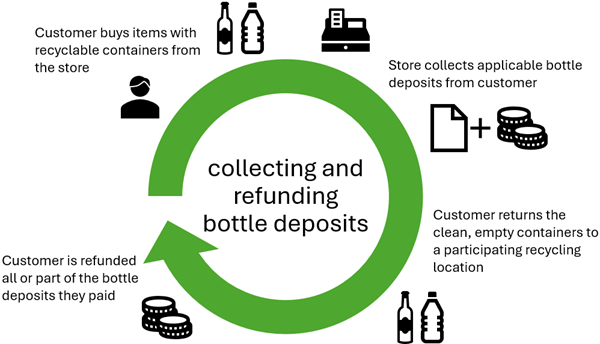
In most container recycling programs, bottle deposits are collected from customers when they purchase items with recyclable containers. All or part of those deposits are refunded to customers when they return the clean, empty containers to a participating recycling location.
Some jurisdictions have a flat deposit amount for all eligible recyclable containers. Other jurisdictions have different deposit amounts for different types or sizes of containers. For example, a jurisdiction might have a $0.10 bottle deposit for aluminum cans and a $0.20 bottle deposit for large plastic or glass bottles.
Similarly, some jurisdictions require retail stores to accept clean, empty, eligible containers from customers and refund the relevant bottle deposits to them. In other jurisdictions this is optional. In jurisdictions where stores are required to accept eligible containers, it is common for stores to set daily limits on how many eligible containers each customer can bring to the store for bottle deposit refunds, e.g., a maximum of 24 cans per customer per day.
To charge customers a bottle deposit, you must create a non-inventory bottle deposit item and enter a price, such as $0.10. When there are different bottle deposit amounts (e.g., $0.10 for individual aluminum cans, $0.60 for six-packs of aluminum cans, $0.20 for large bottles) you must create separate non-inventory bottle deposit items with different prices.
The easiest way to charge bottle deposits is to assign the relevant bottle deposit item as a tag-along item. For example, for an individual can of soda, you would assign the $0.10 bottle deposit item as a tag-along item. For a six-pack of soda cans, you would assign the $0.60 bottle deposit item as a tag-along item. With this approach, when the cashier or salesperson adds an individual can of soda or a six-pack of soda cans to a transaction, the relevant bottle deposit item is automatically added as a tag-along item and the cashier or salesperson does not need to manually add the bottle deposit item.
If it is not feasible to assign the bottle deposit item as a tag-along item, you can define custom POS buttons or POS task pad buttons that cashiers or salespeople can use to quickly add bottle deposit items to transactions. The store would also need to train all cashiers and salespeople to consistently add the bottle deposit items to transactions whenever it is applicable. However, this can be risky, since it requires manual entry by cashiers and salespeople.
It is a best practice to assign a department and category to the non-inventory items used to collect bottle deposits. This makes it easier to exclude bottle deposits from store sales reports, or to create reports to track how much the store has collected or refunded in bottle deposits.
---
# Agent Instructions
This documentation is published with GitBook. GitBook is the documentation platform designed so that both humans and AI agents can read, navigate, and reason over technical content effectively. Learn more at gitbook.com.
## Querying This Documentation
If you need additional information that is not directly available in this page, you can query the documentation by asking a question.
Perform an HTTP GET request on the following URL with the `ask` and `goal` query parameters:
```
GET https://docs.rmhpos.com/store-manager/manage-items/bottle-deposits/understanding-bottle-deposits.md?ask=&goal=
```
`ask` is the immediate question: it should be specific, self-contained, and written in natural language.
`goal` is what the user is ultimately trying to achieve, the reason they need the answer. Sharing it helps GitBook give you a better, more relevant answer. A goal is most helpful when it describes the outcome the user wants rather than restating the question. For example, with `ask=how do I create an API token`, a goal like `automate deployments from our CI pipeline` lets GitBook tailor the answer to that use case.
The response will contain a direct answer to the question and relevant excerpts and sources from the documentation.
Use this mechanism when the answer is not explicitly present in the current page, you need clarification or additional context, or you want to retrieve related documentation sections.