> For the complete documentation index, see [llms.txt](https://docs.rmhpos.com/llms.txt). Markdown versions of documentation pages are available by appending `.md` to page URLs; this page is available as [Markdown](https://docs.rmhpos.com/store-manager/manage-items/bag-fees-and-bag-taxes/understanding-bag-fees-bag-taxes.md).
# About bag fees and bag taxes
This topic describes best practices for bag fees and bag taxes.
Many jurisdictions encourage customers to use recyclable or reusable shopping bags by charging bag fees or bag taxes in retail stores.
## Bag fees
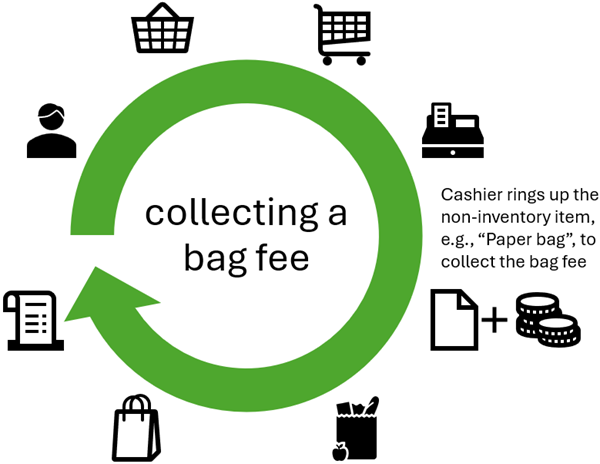
The bag fee system is simpler than the bag tax system. In a bag fee system, customers who do not bring their own shopping bags to the store can purchase bags at point-of-sale for a small fee. There are usually regulations regarding what type of bags the store can sell. For example, to encourage recycling and reuse, stores may be required to sell only recyclable paper bags or sturdy reusable bags. Stores are usually allowed to keep bag fees to cover the cost of purchasing and supplying the bags, but there may be regulations about how stores inform customers about bag fees, how they record bag fees on purchase receipts, and how much they can charge for bag fees. Regulations may also determine whether bag fees are taxable or non-taxable.
To charge customers a bag fee, you must create a non-inventory bag item, e.g., "Paper bag" and enter a price, such as $0.25. If the store has different bag fees (e.g., $0.25 for a paper bag and $2.00 for a reusable shopping bag) you must create separate non-inventory bag items with different prices. Cashiers and salespeople must add these non-inventory bag items to transactions in POS to collect the bag fees. It is a best practice to define custom POS buttons or POS task pad buttons that cashiers or salespeople can use to quickly add non-inventory bag items to transactions.
It is also a best practice to assign a department and category to the non-inventory bag items used to collect bag fees. This makes it easier to exclude bag fees from store sales reports (if desired), or to create reports to track how much the store has collected from bag fees.
## Bag taxes
In a bag tax system, a bag tax is applied to specific types of bags (such as single-use plastic bags) that are provided to customers in retail stores. Stores are usually be allowed to provide the bags to customers for free, but they must collect a bag tax from customers for each bag they use. Bag taxes usually a set amount per bag, such as $0.05 per bag. The store must remit the bag taxes that they collect to the relevant governing organization in their jurisdiction.
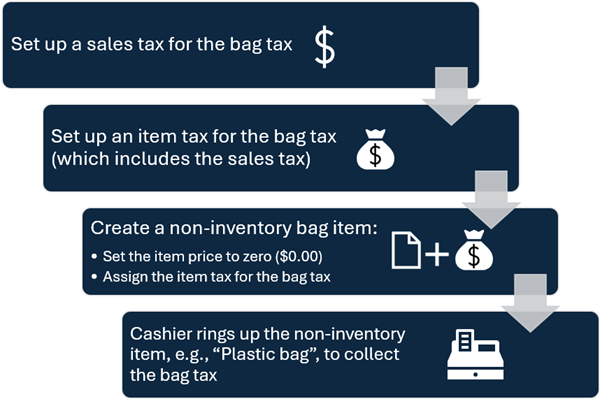
To charge customers a bag tax, you must set up a sales tax for the bag tax, and then include the sales tax in an item tax that is used exclusively to collect the bag tax. You must also create a non-inventory bag item, e.g., "Plastic bag", and assign the item tax to this item. (Refer to [**Setting up bag taxes**](/store-manager/manage-items/bag-fees-and-bag-taxes/setting-up-bag-taxes.md) for the detailed procedure.) Cashiers and salespeople must add these non-inventory bag items to transactions in POS to collect the bag tax. It is a best practice to define custom POS buttons or POS task pad buttons that cashiers or salespeople can use to quickly add non-inventory bag items to transactions.
It is also a best practice to assign a department or category to the non-inventory bag items used to collect bag taxes. This makes it easier to exclude bag tax "sales" from sales reports. You can use active reports such as the **Sales Tax Collected** or **Detailed Sales Plus Tax** reports to report on how much the store has collected from the bag tax.
---
# Agent Instructions
This documentation is published with GitBook. GitBook is the documentation platform designed so that both humans and AI agents can read, navigate, and reason over technical content effectively. Learn more at gitbook.com.
## Querying This Documentation
If you need additional information that is not directly available in this page, you can query the documentation dynamically by asking a question.
Perform an HTTP GET request on the current page URL with the `ask` query parameter, and the optional `goal` query parameter:
```
GET https://docs.rmhpos.com/store-manager/manage-items/bag-fees-and-bag-taxes/understanding-bag-fees-bag-taxes.md?ask=&goal=
```
`ask` is the immediate question: it should be specific, self-contained, and written in natural language.
`goal` is optional and describes the broader end goal you are ultimately trying to accomplish on behalf of the user. GitBook uses it to tailor the answer towards what is most useful for that goal.
The response will contain a direct answer to the question and relevant excerpts and sources from the documentation.
Use this mechanism when the answer is not explicitly present in the current page, you need clarification or additional context, or you want to retrieve related documentation sections.