> For the complete documentation index, see [llms.txt](https://docs.rmhpos.com/llms.txt). Markdown versions of documentation pages are available by appending `.md` to page URLs; this page is available as [Markdown](https://docs.rmhpos.com/store-manager/manage-customers/advantages-collecting-customer-info.md).
# Advantages of collecting customer information
This topic describes best practices for collecting customer information in RMH.
There are a number of advantages to collecting information about your store's customers:
* If your customers consent to direct or mass communication, you can mail or email promotional material to them;
* You can generate reports on customer sales that identify top customers, customer ordering or purchasing trends, and profit margins; or
* You can use customer information to help you identify specific products or services that customers will be interested in buying from your store.
## How to require customer selection in POS
Some stores, such as stores that sell firearms, are legally required to collect customer information for every transaction. Other stores like to collect customer information purely for marketing purposes or to provide a more personal shopping experience to customers.
You can configure Store Manager to require customer selection for every transaction in POS. This is defined in Store Manager in **File** | **Configuration** | **Store Rules**. Under **Customer Options**, select **Require customer selection for sales**.
{% hint style="success" %}
If you have Require customer selection for sales enabled, but customers are not legally required to share their information with your store, be prepared for customers who will decline to share their name or contact information. In these circumstances, it can be useful to have a "bucket" customer account set up in the database. This is a generic customer account that does not belong to a real person but can be used to process transactions when customers do not want to share their information. For example, if you store sells pet food and pet supplies, you might create a bucket customer account for "Pet Lover".
{% endhint %}
## How to use custom fields to collect customer information
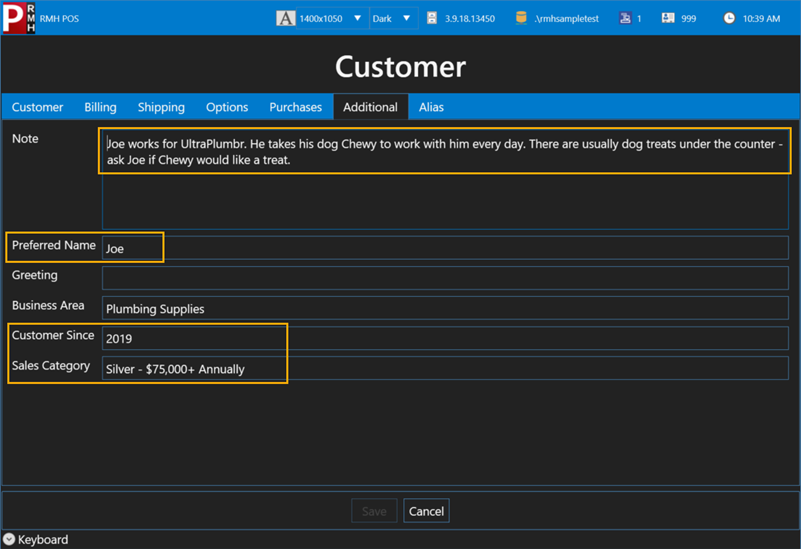
Custom fields can help your store provide a more personal shopping experience to customers. For example, you might set up custom fields in Store Manager and POS to collect the customers' preferred name or their store-related interests. A skilled cashier or sales representative can use this information to warmly greet the customer and initiate a conversation about products or promotions that might be interesting to the customer.
In the example below, cashiers and sales representatives can see that customer Jorge Herrera prefers to be called Joe, and that he is a long-term customer who buys over $75,000 in products annually. They can also see that Joe usually brings his dog Chewy to work with him, and suggests asking whether Chewy would like one of the dog treats that the store keeps under the counter for customers' pets.
You can configure custom fields in Store Manager in **Setup** | **Miscellaneous** | **Custom Fields**. You can enter customer information in these fields in either Store Manager or POS.
---
# Agent Instructions
This documentation is published with GitBook. GitBook is the documentation platform designed so that both humans and AI agents can read, navigate, and reason over technical content effectively. Learn more at gitbook.com.
## Querying This Documentation
If you need additional information that is not directly available in this page, you can query the documentation dynamically by asking a question.
Perform an HTTP GET request on the current page URL with the `ask` query parameter, and the optional `goal` query parameter:
```
GET https://docs.rmhpos.com/store-manager/manage-customers/advantages-collecting-customer-info.md?ask=&goal=
```
`ask` is the immediate question: it should be specific, self-contained, and written in natural language.
`goal` is optional and describes the broader end goal you are ultimately trying to accomplish on behalf of the user. GitBook uses it to tailor the answer towards what is most useful for that goal.
The response will contain a direct answer to the question and relevant excerpts and sources from the documentation.
Use this mechanism when the answer is not explicitly present in the current page, you need clarification or additional context, or you want to retrieve related documentation sections.