> For the complete documentation index, see [llms.txt](https://docs.rmhpos.com/llms.txt). Markdown versions of documentation pages are available by appending `.md` to page URLs; this page is available as [Markdown](https://docs.rmhpos.com/es/installation/install-central-manager-multi-store/manage-services/consistency-checker/consistency-checker-command-prompt.md).
# Ejecutar manualmente desde el Símbolo del sistema o PowerShell
Este tema describe cómo ejecutar manualmente el Comprobador de coherencia desde el Símbolo del sistema o PowerShell.
En el equipo donde está instalado Central Client:
1. Abrir **Central Client**.
2. Detenga todos los servicios del cliente.
3. Abrir **Símbolo del sistema** o **PowerShell**.
4. Vaya a **C:\Program Files (x86)\Retail Hero\RMH Central Flash Client**.
5. Ejecute el **RMH.Central.ConsistencyChecker.exe** ejecutable con privilegios de administrador.
Puede establecer el período de sincronización usando los parámetros:
* `período:día` o `-p:D`
* `período:semana` o `-p:W`
* `período:mes` o `-p:M`
{% hint style="info" %}
Un día son las 24 horas anteriores, una semana son los 7 días anteriores y un mes va desde el día actual (p. ej., 15) hasta el mismo día del mes anterior.
{% endhint %}
Puede identificar qué tipo de registros sincronizar usando los parámetros:
* `incluir:ventas` o `-i:S`
* `incluir:retirosypagos` o `-i:DP`
* `incluir:pedidos` o `-i:O`
* `incluir:orden de compra` o `-i:PO`
* `incluir:reloj de fichar`, `incluir:tarjeta de tiempo`, o `-i:TC` para sincronizar tanto el reloj de fichar como la tarjeta de tiempo
{% hint style="info" %}
Si no especifica qué tipo de registros sincronizar (p. ej., ventas, retiros o pagos, pedidos, órdenes de compra/transferencias, entradas de reloj de fichar o de tarjeta de tiempo), el Comprobador de coherencia sincronizará todos los tipos de registros.
{% endhint %}
Puede ejecutar el **RMH.Central.ConsistencyChecker.exe** ejecutable en modo silencioso (es decir, sin indicaciones al usuario) usando uno de los siguientes parámetros:
* `-n`
* `--nowait`
{% hint style="info" %}
Si ha configurado Central Manager y varias tiendas en una máquina de prueba, y está ejecutando varias instancias de Central Client, puede ejecutar el Comprobador de coherencia para una instancia específica introduciendo el nombre de la carpeta de la instancia como parámetro, por ejemplo, `-c "RMH Central Client 2"`. Consulte [**Configurar Central Manager y varias tiendas en una máquina de prueba**](/es/installation/other-procedures/installation-cm-stores-test-machine-flash.md) para obtener más información.
{% endhint %}
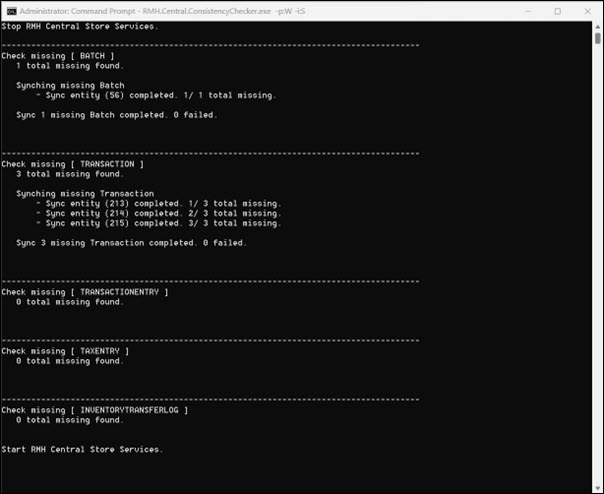
Ejemplo de cómo sincronizar las ventas de los últimos 7 días:
Ejemplo de cómo sincronizar los pedidos de las últimas 24 horas:
Ejemplo de cómo sincronizar las órdenes de compra/transferencias del último mes:
Ejemplo de cómo sincronizar los retiros o pagos de las últimas 24 horas:
Ejemplo de cómo sincronizar las entradas de reloj de fichar o tarjeta de tiempo de las últimas 24 horas:
---
# Agent Instructions
This documentation is published with GitBook. GitBook is the documentation platform designed so that both humans and AI agents can read, navigate, and reason over technical content effectively. Learn more at gitbook.com.
## Querying This Documentation
If you need additional information that is not directly available in this page, you can query the documentation by asking a question.
Perform an HTTP GET request on the following URL with the `ask` and `goal` query parameters:
```
GET https://docs.rmhpos.com/es/installation/install-central-manager-multi-store/manage-services/consistency-checker/consistency-checker-command-prompt.md?ask=&goal=
```
`ask` is the immediate question: it should be specific, self-contained, and written in natural language.
`goal` is what the user is ultimately trying to achieve, the reason they need the answer. Sharing it helps GitBook give you a better, more relevant answer. A goal is most helpful when it describes the outcome the user wants rather than restating the question. For example, with `ask=how do I create an API token`, a goal like `automate deployments from our CI pipeline` lets GitBook tailor the answer to that use case.
The response will contain a direct answer to the question and relevant excerpts and sources from the documentation.
Use this mechanism when the answer is not explicitly present in the current page, you need clarification or additional context, or you want to retrieve related documentation sections.